
- Centralized Organization: Consolidate notes, room numbers, and schedules in NotebookLM to eliminate paper clutter and fragmented documents.
- Automated Summaries: Generate instant recaps of previous coaching interactions to stay prepared for every school visit.
- Smart Scheduling: Add summaries to Google Calendar invites to keep both coach and teacher aligned on goals and progress.
Instructional coaches often find themselves juggling a massive amount of data, from professional development schedules to individual teacher meeting notes. When you are supporting upwards of 20 different school sites, the logistical challenge of staying organized can easily overshadow the actual coaching work. It is important to note that this same workflow can work effectively even if you support only one school site, as the need for organized, accessible data remains a universal priority for any coach. By pairing the organizational power of NotebookLM with the scheduling reliability of Google Calendar, you can transform a mountain of notes into a highly efficient, streamlined workflow.
The foundation of this system starts with organizing your documentation. By creating dedicated documents within NotebookLM for each school site, you can house every coaching interaction and professional development session in one searchable location. Including specific logistical details like teacher room numbers and prep periods directly within these documents is a simple step that pays huge dividends later. Instead of flipping through various spreadsheets or notebooks to find out when a teacher is available, all the necessary information remains tethered to the coaching narrative itself.
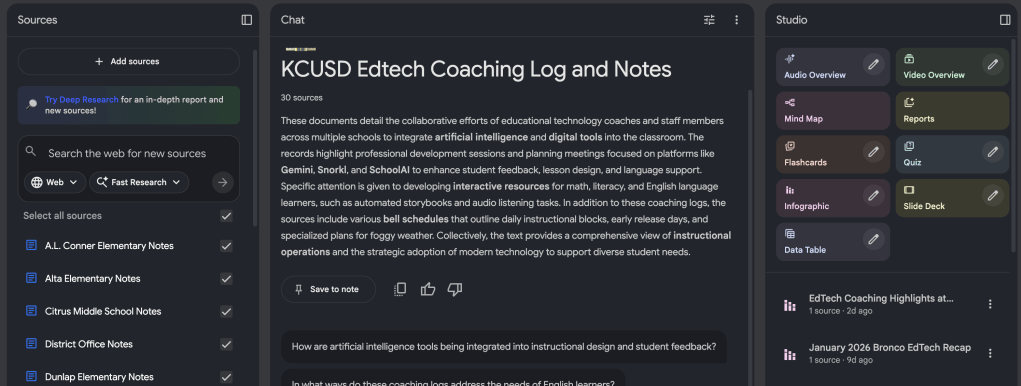
The real efficiency begins before you even step foot on a school campus. Prior to a site visit, you can ask NotebookLM to generate a summary recap of the most recent coaching or PD interactions for that specific location. In seconds, the tool can provide a concise overview of the support provided to individual teachers, grade levels, or departments. By specifically asking the tool to include prep periods and room numbers in this summary, you receive a complete “cheat sheet” for your day. This eliminates the need to manually sift through pages of data to remember where you left off with a particular educator.
Once you have this summary, you can move directly into the scheduling phase. Using two monitors is helpful for this process, though not required. With your NotebookLM recap open on one side and Google Calendar on the other, you can begin populating your schedule. Since you already have the prep period times at a glance, you can quickly identify the best windows to send calendar invites for follow-up meetings. This removes the friction of back-and-forth emails or checking master schedules.
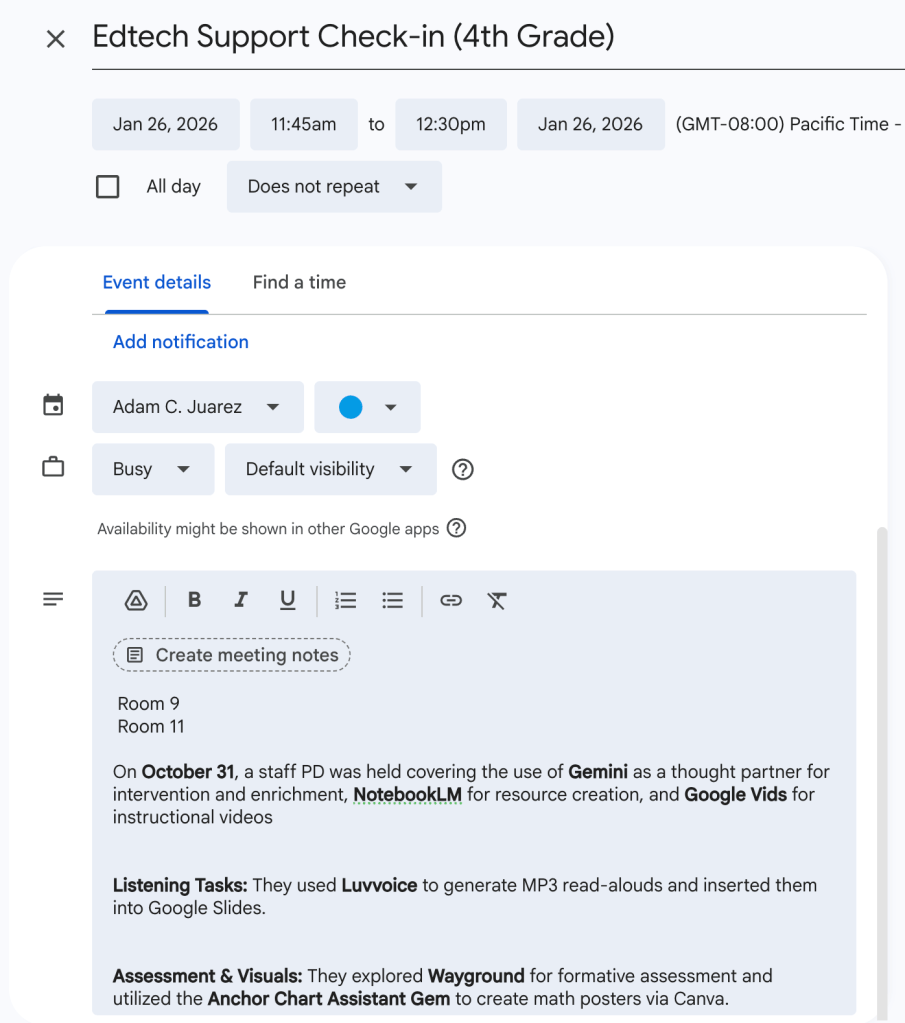
To further enhance the coaching relationship, you can copy the specific recap generated by NotebookLM and paste it directly into the notes section of the Google Calendar event. When the teacher receives the invite, they immediately see a summary of the previous interaction. This transparency ensures that both the coach and the coachee are on the same page before the meeting even starts. It provides a clear starting point for the next conversation and demonstrates a high level of intentionality and preparation.
Adopting these digital tools allows instructional coaches to move away from the clutter of handwritten notes and disjointed documents. By letting technology handle the organization and summarization of logistics, you free up more mental energy to focus on what matters most: supporting teachers and improving student outcomes. This workflow does not just save time. It creates a professional, reliable system that benefits everyone involved in the coaching process.
This blog post was drafted with the help of Google Gemini to help organize and flesh out my thoughts and ideas regarding how to use NotebookLM and Google Calendar to manage instructional coaching notes and scheduling of coaching sessions. I also used NotebookLM to generate a brief audio overview, perfect for those who want to listen and learn on the go.
If you enjoy this blog, you’ll love our new book, History Matters in an AI Era. Available now on Amazon, this book shares practical, research-based strategies for integrating technology into history lessons. You’ll learn how to use technology to increase student engagement and curiosity. Click here to get your copy today.

Leave a comment