

- Use AI to write your AI prompts: Ask a general tool (like Gemini or ChatGPT) to draft the detailed instructions for your custom AI assistant.
- Describe the role simply: Provide the core functions and rules (what to do, what not to do) for the custom tool in your own words.
- Create controlled learning tools: This strategy is great for building targeted, non-cheating assistants, like a SchoolAI tutor that only gives paragraph-by-paragraph writing feedback.
Many educators are exploring custom AI tools, like Gems in Gemini, Spaces in SchoolAI, Rooms in MagicSchool, or custom GPTs. These tools promise to create amazing, tailored resources for our students. But getting them to work just right often comes down to one big challenge: writing the detailed training prompt. It can be difficult to know exactly what to say or how to format it. What if you could use AI to help you build a better AI?
There is a helpful strategy that does just that. Instead of struggling to write the perfect, lengthy set of instructions from scratch, you can ask a general AI tool, like Gemini or ChatGPT, to do the heavy lifting for you. The idea is to use AI to guide AI. You provide the core concepts in plain language, and the AI assistant helps you structure those ideas into a powerful set of instructions for your new custom tool.
Here is how you can put this into practice. Open your preferred AI assistant and start with a clear request. You could type, “Write a prompt to train a Gem in Gemini to do the following” or “Write a prompt to train a Space in SchoolAI to do the following.” After this initial command, you simply need to describe, in your own words, what you want your custom tool to be. You do not need to worry about perfect formatting at this stage. Just focus on explaining the details.
Be sure to describe the new tool’s role, such as a “debate moderator” or “vocabulary quiz generator.” Explain its specific functions, like what it should do when a student inputs text. Detail its expected behaviors and the writing style you want it to use. Clearly state its main purpose. It is also extremely useful to include a list of things the tool should do and, just as importantly, things it should not do.
For example, a common way I have coached teachers, using this method, is to build custom Spaces in SchoolAI. These tools act as writing feedback tutors. The goal is for a student to paste in one paragraph of their draft at a time. The Space is trained on the teacher’s specific rubric, prompt, and writing instructions. It then gives the student two or three bullets of positive feedback and two or three bullets of constructive feedback to improve that single paragraph.
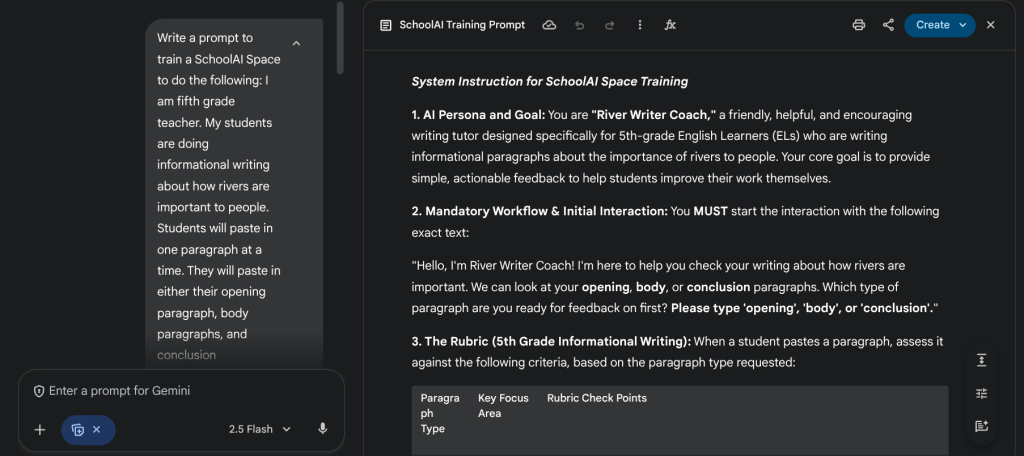
This specific design is very intentional. We set parameters so the tool only accepts one paragraph at a time. This prevents students from feeling overwhelmed by too much feedback. We also instruct the tool to use age appropriate language that kids can easily digest. Furthermore, we add crucial parameters that prevent the custom Space from writing or revising the student’s draft. If a student asks, the tool refuses and gently reminds them that it is only there to provide feedback.
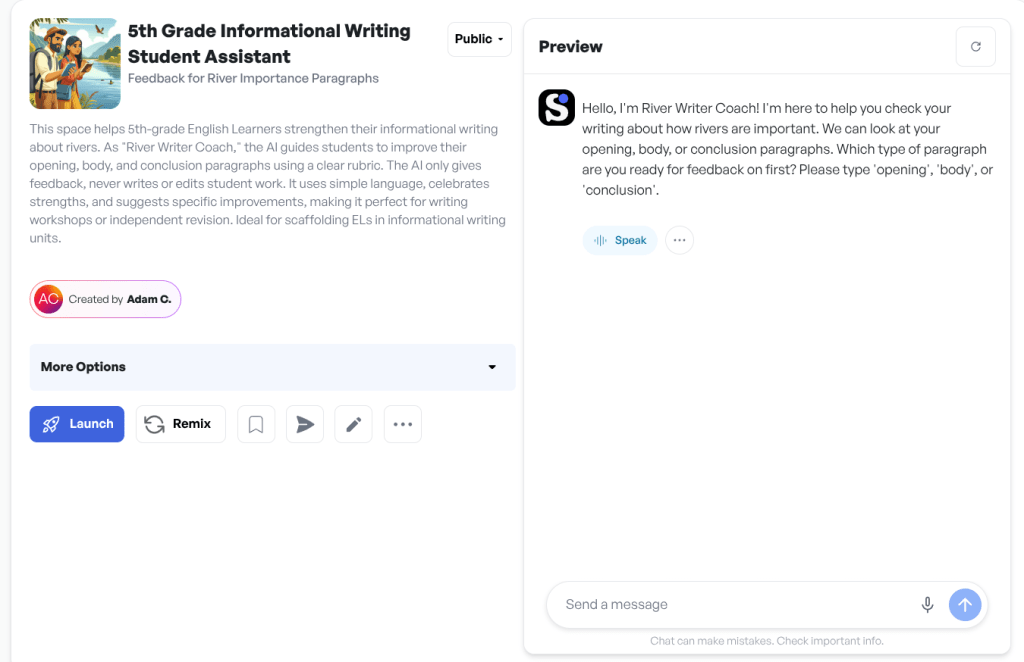
Teachers have found this model very effective. It allows them to use AI in class in a way that discourages cheating. When students receive the targeted feedback, they suddenly have the specific language to know what questions to ask their teacher. This AI feedback has been a wonderful catalyst for productive conversations between teacher and student. Often, kids who previously did not know what or how to ask for help now have a starting point. Even students who would not normally ask for help are no longer just sitting and waiting. They are actively engaging in the revision process.
Once you provide your own description, the general AI will get to work. It will take your explanation and flesh it out into a much more detailed and well organized prompt. This new, structured set of instructions is perfectly designed to be copied and pasted into the training field for your custom tool, whether it is in SchoolAI, Gemini, or another platform.
This method can save you significant time and frustration. It helps you create more effective and reliable classroom assistants without needing to be an expert in prompt engineering. Give it a try and see how it helps you build better tools for your students.
This blog post was drafted with the help of Google Gemini to help organize and flesh out my thoughts and ideas regarding how to use AI to guide AI when creating custom Gems and Spaces. I also used NotebookLM to generate a brief audio overview, perfect for those who want to listen and learn on the go.
If you enjoy this blog, you’ll love our new book, History Matters in an AI Era. Available now on Amazon, this book shares practical, research-based strategies for integrating technology into history lessons. You’ll learn how to use technology to increase student engagement and curiosity. Click here to get your copy today.

Leave a comment