

- Analyzing football game film provides a simple analogy for teaching fundamental computer science.
- Abstract concepts like variables and AI training are made concrete by linking them to actions like naming players and labeling plays.
- Educators can adapt this method for any content-specific video, allowing students to actively analyze content and learn complex tech concepts.
At first glance, the worlds of college football and computer science seem miles apart. One is about physical strategy on a field, the other about logical commands on a screen. Yet, the way an analyst breaks down game film provides a surprisingly effective and relatable framework for introducing students to complex computational thinking. It’s a practical way to show that the building blocks of technology are all around us.
This connection became clear to me through a personal hobby. As a rabid fan of the Fresno State Bulldogs, I started a new series on my YouTube channel called “Snap to Whistle.” In it, I break down full game videos. Using iMovie, I “chop” the footage into smaller clips that only show the action from the snap to the whistle on each play. All the time between plays gets deleted. This process condenses a three hour broadcast into about an hour of pure football. To make it easier to navigate, I also add a timestamp for every single play, along with a short description, right in the YouTube video description.
This process mirrors coding, starting with the descriptions I write for each play. For those timestamps, the first time a player is mentioned, I use their full name. As they are mentioned again throughout the game, I only use their last name. This is partly due to the 5000 character limit in a YouTube video description. This is very similary to how the concept variables works in coding. We assign a value, like a player’s full name, to a memorable variable, like their last name. This makes the code easier to read and allows that same variable to be used again and again. Using variables helps organize the program and makes it more flexible.
The editing process of creating “Snap to Whistle” videos is similar to the concept of abstraction. In computer science, abstraction refers to the hiding of complex details to focus on the essential information. Removing the huddle, the commentary, and the post-play celebrations allows an analyst to work more efficiently without getting lost in specifics. The timestamps I add create a clean, focused model of the game, simplifying the whole experience for the viewer.
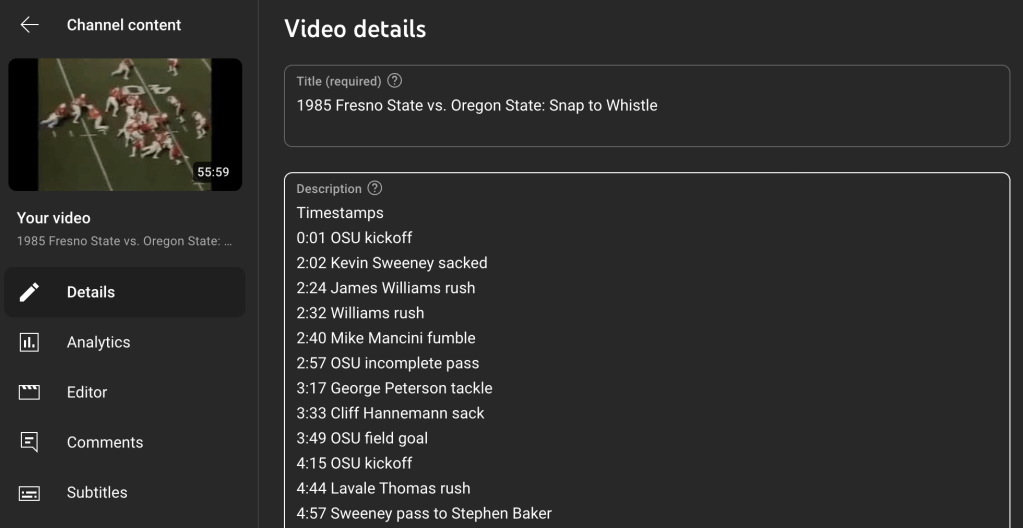
Finally, the analysis itself mirrors how artificial intelligence learns. When I write a short description for each timestamped play, I am labeling the event with a specific outcome. For my football videos, this means classifying each clip as an incomplete pass, completed pass, rush, touchdown, or field goal. This act of labeling is very similar to supervised AI training. It is a human-centric process that involves feeding a machine labeled data so it can learn to identify patterns and make classifications. A person teaches the system by providing it with correct answers, not letting the machine make assumptions on its own. It is a foundational method for training the AI bots we interact with daily.
Bringing this playbook into your classroom can engage students in new ways. You can put this into practice with a simple lesson where the objective is for students to apply the concepts of variables, abstraction, and data classification to analyze a short video clip. To begin, have students form small groups to watch a five minute documentary or educational video. Task them with identifying the key people or concepts and assigning them shorter, easy to reference names, which puts the idea of variables into practice.
From there, students can practice abstraction by breaking the video into essential segments, noting the start and end times for each. This can be done on paper or digitally. To simulate the data labeling process in AI training, have the groups create simple labels to classify each segment’s purpose, such as “Introduction” or “Main Argument.” The lesson can conclude with a class discussion on how these steps helped them better understand the video’s structure and core message, connecting their hands-on work to the bigger ideas of computer science.
This blog post was drafted with the help of Google Gemini to help organize and flesh out my thoughts and ideas regarding the similarities between my hobby and computer science concepts. I also used NotebookLM to generate a deep dive audio overview, perfect for those who want to listen and learn on the go.

Leave a comment